

Software Project Rescue Guide 2026: Rescue Before It’s Too Late!
TL;DR
To rescue a failing software project, first freeze new scope and assess the existing code, architecture, infrastructure, and remaining work. Then determine whether the project should be rescued or rebuilt, reduce the scope to its core business value, stabilize the codebase, reset the delivery plan, and assign clear ownership. Finally, prove the recovery by shipping a working milestone and tracking delivery metrics.
Your software project was supposed to launch months ago. Instead, deadlines keep slipping, costs are rising, and each update creates more uncertainty. The roadmap you approved no longer reflects reality. Stakeholders are looking for answers, while you’re left wondering if the project will ever reach the finish line.
This situation is more common than many leaders expect. According to industry reports, in the US alone, failed projects waste $50 to $150 billion every year, while globally the losses add up to $1.8 trillion annually.
However, the good news is that a struggling project can often be recovered. But before investing more time or budget, you need to understand what went wrong and what needs to change.
At Idea Maker, we've worked with companies that came to us after months of stalled development, missed releases, or disappointing vendor handoffs. Today, we’ll share our software project rescue guide to help you assess a struggling project and decide whether to rescue or rebuild.
You’ll also learn when software project rescue services can help you regain control before more time and budget are lost.
Key Takeaways
- Failing software projects often show the same warning signs: repeated delays, rising costs, unclear scope, missing working demos, and weak ownership.
- McKinsey estimates large IT projects run 45% over budget, 7% over time, and deliver 56% less value than predicted.
- A technical and delivery audit gives you the evidence to decide whether the project should be rescued, rebuilt, or stopped.
- Rescue works when the core architecture, codebase, and business case are still viable; rebuilding makes more sense when the foundation cannot support the required outcome.
- Cut unnecessary scope and focus development on the core features needed to deliver business value.
- Clear ownership, senior technical leadership, and measurable delivery are critical to recovering stalled projects.
What Does Software Project Rescue Mean?
Software project rescue is the process of assessing a struggling project, identifying the root causes of failure, and taking corrective actions to bring it back under control. It helps teams recover stalled development, reduce wasted investment, and create a realistic path toward delivery.
In our experience, the biggest challenge in a failing project is often the uncertainty around what is actually broken. Teams may be focused on adding features while underlying issues in architecture, code quality, or implementation continue to slow progress. A rescue effort brings clarity by separating surface-level symptoms from the problems that are putting the project at risk.
For example, a healthcare company came to us where development had stalled, and the existing AI chatbot, Support Sherpa, was not ready to move toward production. The project needed a deeper review to uncover technical gaps and strengthen the backend foundation. We assessed the existing implementation and rebuilt key backend components needed for a secure ChatGPT integration. That’s how Idea Maker then turned an uncertain development effort into a fully functional AI-powered chatbot ready for users.
What are the Signs Your Software Project Needs Rescuing?
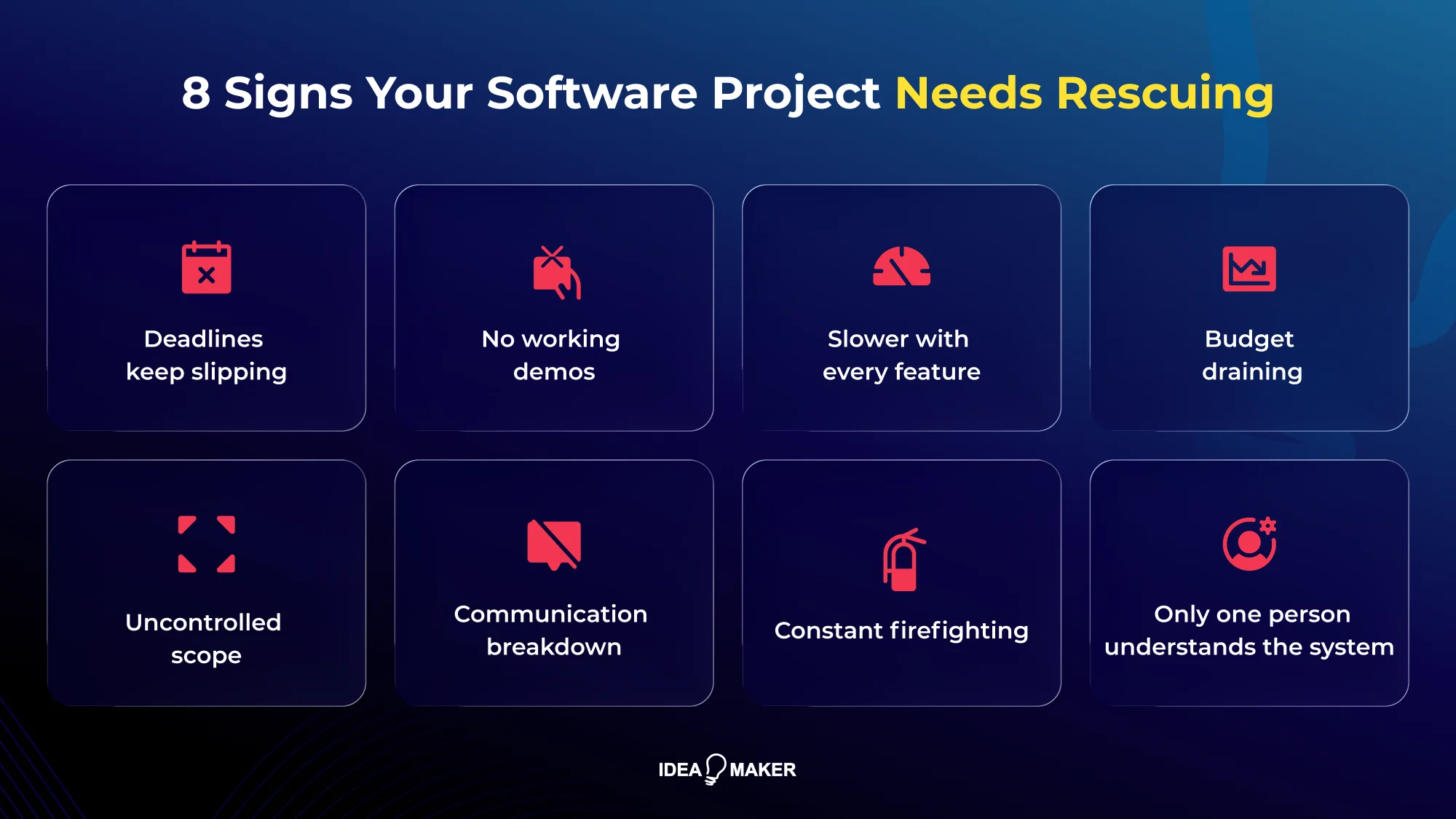
Your software project likely needs rescuing when progress becomes difficult to measure, delivery becomes unpredictable, and the team spends more time explaining problems than shipping solutions. Over the years, we’ve reviewed dozens of struggling software projects, and these are the warning signs we see before teams lose control of delivery:
Deadlines keep slipping
Your launch date has moved multiple times, but every new estimate feels like another guess. The team cannot explain what needs to change to actually meet the next deadline. A delayed milestone is normal in software development. However, repeated delays without a realistic recovery plan usually indicate deeper issues with planning, execution, or technical decisions.
No working demos
Demos are replaced with slides, screenshots, or partial features. You cannot open the product and see the core workflows working as expected.
Development Gets Slower With Every Feature
A feature that should take days now takes weeks. Small changes introduce new bugs because the codebase has become difficult to maintain. If the team cannot demonstrate real progress, it becomes difficult to know whether development is moving forward or whether problems are being hidden behind updates and reports.
Budget Draining
You have invested months of time and budget, but the amount of usable product delivered does not match the investment. Rising costs are especially concerning when there is no clear connection between engineering effort and business outcomes. A larger budget will not fix a project without visibility and direction.
This is why planning your software development budget matters from the start: estimate costs against defined scope, milestones, team capacity, and realistic delivery risks.
Uncontrolled scope
Requirements change faster than the team can absorb them. The team is constantly building, removing, and rebuilding features because priorities are unclear or requirements are not properly managed. Changing requirements are expected, but uncontrolled scope changes create rework, delay releases, and prevent the team from completing the features that matter most.
Communication breakdown
Leadership, product, and engineering are out of sync. You expect one outcome, your product team expects another, and your developers are working with different assumptions about priorities.
The Team Is Always Fixing Emergencies
Every sprint is dominated by bugs, urgent fixes, and unexpected issues, leaving little time for planned improvements. A constant firefighting cycle usually means the team is reacting to symptoms instead of addressing the root causes affecting stability and delivery.
Only One Person Understands the System
A single developer holds critical knowledge about the architecture, codebase, or infrastructure, creating a serious delivery risk. This dependency slows down decisions, makes onboarding difficult, and puts the entire project at risk if that person leaves or becomes unavailable.
That’s why it’s important to have a clear handover plan when a key developer leaves mid-project, so another engineer can take over without losing critical context.
Why Do Software Projects Fail?
Software projects usually fail because small planning, technical, and delivery problems compound until the team can no longer make reliable progress. By the time missed milestones become obvious, the underlying issues may already be expensive to fix.
Unrealistic or Purely Aspirational Planning
Plans fail when scope, budget, resources, dependencies, and risks are based on assumptions rather than evidence. A plan becomes unrealistic when it assumes everything will go smoothly. For example, estimating a six-month product without accounting for third-party integrations, data migration, testing, approvals, or infrastructure creates a schedule and budget the team cannot realistically meet. Once those missing pieces surface, every downstream milestone moves.
Unclear or Constantly Shifting Requirements
When the team is still discovering what the product should do during development, engineers repeatedly build, revise, and rebuild the same functionality. A payment workflow may change after the backend is already built, forcing changes across APIs, database logic, UI, and testing. The project loses both time and predictability.
Underestimated Technical Complexity
Some requirements hide substantial engineering work. A “simple” integration may involve incompatible APIs, unreliable data, authentication requirements, rate limits, or complex data mapping. When these constraints are discovered after development starts, estimates become inaccurate, and previously completed work may need to be reworked.
Weak Leadership and Ownership
Projects stall when decisions have no clear owner or blockers remain unresolved for days. Developers may be waiting for product decisions while business teams assume development is progressing. Clear ownership gives every major requirement, technical decision, and delivery milestone someone accountable for moving it forward.
The Wrong Tech Stack or Architecture for the Load
An architecture that works for an early prototype may become a serious constraint as users, data, integrations, or feature requirements grow. Teams then spend increasing amounts of time working around the system instead of improving it. The right architecture should support the product's current scope while leaving a practical path for expected growth.
Poor Communication and Translation Gaps Between Business and Engineering
A requirement can mean something very different to a business stakeholder, product manager, and developer. Those gaps often surface only when a feature is demonstrated, and the result does not match expectations. Clear acceptance criteria, technical clarification, and regular working demos reduce expensive misunderstandings.
Low Test Coverage and Missing CI/CD
When critical workflows are poorly tested, developers cannot confidently change the code without risking existing functionality. Releases become increasingly manual and cautious, with bugs discovered late during staging or production testing. The result is a project where even small fixes take longer because the team cannot quickly verify what they may have broken.
Should You Rescue or Rebuild Your Software Project?
Whether you should rescue or rebuild your software project depends on the health of its technical foundation and your business priorities. If the architecture and codebase are still maintainable, a rescue is usually faster and more cost-effective. If the software is built on a fragile architecture or an unmaintainable codebase, rebuilding often delivers better long-term value.
After reviewing and taking over struggling software projects, we’ve found that the decision usually comes down to a few clear situations:
| Situation | Best Decision |
| Business goals are still valid, but execution has fallen behind | Rescue |
| Core features work, but the project needs improvements and cleanup | Rescue |
| Codebase is maintainable, but technical debt is slowing progress | Rescue |
| Architecture can support future needs with targeted changes | Rescue |
| Architecture cannot support the required features or scale | Rebuild |
| Code quality is so poor that every change creates new issues | Rebuild |
| Security, performance, or reliability issues require a major redesign | Rebuild |
| Fixing the existing system costs more than rebuilding it properly | Rebuild |
However, making the right choice requires looking beyond surface-level issues and understanding the actual condition of the project. The only reliable way to make this decision is through a technical assessment.
At Idea Maker, we’ll help you evaluate your project’s architecture, code quality, infrastructure, delivery process, and business requirements. Then we’ll determine what can be recovered, what should be replaced, and whether a rescue effort will deliver a better return than a rebuild.
How to Rescue a Failing Software Project? Step-by-Step Walkthrough
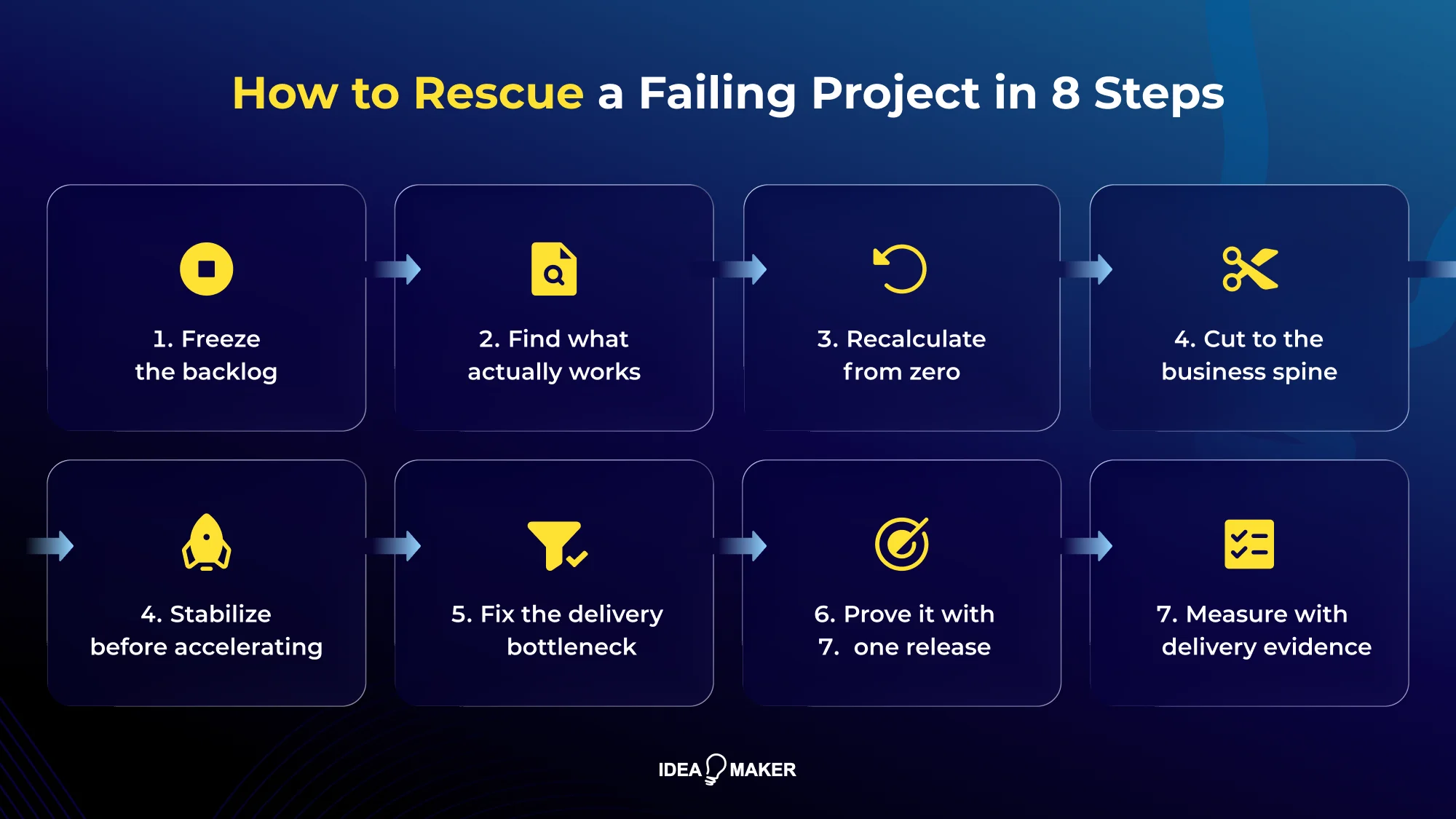
Rescuing a failing software project starts with stopping the conditions that are making it worse. Before you add developers, extend the deadline, or approve another feature, create a stable baseline, establish what is actually recoverable, and rebuild delivery around evidence.
McKinsey estimates that, on average, large IT projects run 45% over budget and 7% over time, while delivering 56% less value than predicted.
If your project is already heading in that direction, the priority is to regain control before more time and budget disappear. Here’s the recovery sequence we recommend.
1. Freeze the Backlog Before You Spend More
Stop adding features while you diagnose the project. Keep only the work required to fix critical defects, security issues, or unblock the core workflow.
Then separate the backlog into three groups:
- Critical: Required for the core product to work or remain secure.
- Important: Valuable, but can wait until the project is stable.
- Deferred: Nice-to-have features with no immediate impact on launch or revenue.
Outcome: Stable scope and no new distractions.
Note: If everything is marked critical, the prioritization has not been done.
2. Find Out What Actually Works
Do not rely on progress percentages from the previous team. Open the application, run the core workflows, review the code, inspect the deployment environment, and compare working functionality against the original scope.
Your audit should answer five practical questions:
- What can users actually do today?
- Which features are incomplete or unreliable?
- Can the existing code be safely modified?
- Where are the major architectural and security risks?
- What work genuinely remains before launch?
A project reported as “80% complete” can look very different once you measure working functionality instead of completed tickets.
Outcome: A verified picture of what works and what remains.
3. Recalculate the Project From Zero
Throw out the old remaining estimate and calculate the work again from the project's current state. Count unfinished features, technical fixes, integrations, testing, deployment, and production readiness, not just development hours.
Your new software development plan should show:
- Remaining work
- Estimated effort
- Dependencies
- Named owners
- Target dates
- Key risks
Outcome: A realistic cost, timeline, and delivery plan.
4. Cut the Scope to the Business Spine
Identify the smallest release that allows customers to complete the product's core job and gives the business a meaningful outcome.
For example, if you are building an inventory platform, the first release may need product setup, inventory updates, and order processing. Advanced analytics, custom reports, and secondary integrations can wait.
The test is simple: If removing a feature does not prevent the core customer workflow, it probably does not belong in the rescue milestone.
Outcome: A smaller scope that the team can actually ship.
5. Stabilize Before Accelerating
Adding developers to an unstable codebase usually increases coordination and rework. First, make the existing system predictable enough to change safely.
Prioritize:
- One reproducible build
- Clean source-control practices
- Critical-path test coverage
- High-severity bug fixes
- Reliable staging and production deployments
- Documented environment and configuration setup
You want the team to make a change, test it, and deploy it without wondering what will break next.
Outcome: A stable codebase ready for continued development.
6. Fix the Delivery Bottleneck
If engineers are working but milestones are not moving, find where work is getting stuck. It may be unclear ownership, slow product decisions, missing technical leadership, excessive handoffs, or a team without the expertise the project requires.
The financial impact can be significant: recent enterprise research estimates that organizations lose an average of $370 million annually because of legacy systems and technical debt, showing how unresolved technical problems can continue draining resources.
The same problem can persist even when teams overrely on AI technologies. Gartner predicts that more than 70% of mainframe exit projects started in 2026 will fail to deliver their intended benefits because organizations overestimate GenAI's capabilities. The point is clear: AI cannot replace developers, nor can it compensate for their poor technical judgment, unclear ownership, or weak execution.
So, do not automatically replace the entire team. Sometimes, one experienced technical lead, product owner, or domain specialist can remove blockers that have been consuming weeks.
Outcome: Clear ownership and faster decisions.
7. Prove the Rescue With One Working Release
Do not wait another three months to find out whether the recovery plan works. Choose one critical workflow and apply proven software deployment strategies and best practices to get it deployed in a real environment.
A working release gives you evidence that the team can complete, test, deploy, and support software again. It also exposes remaining technical or product problems while they are still manageable.
Outcome: One working release that proves the recovery is viable.
8. Measure Recovery With Delivery Evidence
Track metrics that show whether the project is genuinely recovering: completed working features, cycle time, critical bugs, test coverage, deployment frequency, and unresolved blockers.
If four weeks of work produce more tickets, meetings, and promises but no meaningful increase in working functionality, the rescue is not working. Change the plan before another month of investment disappears.
Outcome: Predictable releases and measurable delivery progress.
What a Rescue Audit Should Cover
A software rescue audit should uncover three things: what is broken, what can be recovered, and what it will realistically take to finish the project. It gives you an evidence-based view of your project’s technical condition, remaining effort, and delivery risks before you invest more time or budget.
A complete audit should examine both the technical foundation and the way the project is being managed.
Technical Health
The technical health review determines whether your existing software can still support your product goals or whether bigger changes are required. It focuses on the condition of your codebase, architecture, infrastructure, and technical risks to identify what can be fixed, what needs improvement, and what could block future development.
This matters because technical debt already affects a significant share of enterprise infrastructure: Gartner estimates that around 40% of enterprise infrastructure systems have technical debt concerns. Security must also be part of the assessment, with IBM reporting a $4.4 million global average cost of a data breach in 2025.
Key areas to evaluate include:
- Code quality and test coverage
- Architecture fit for the remaining scope
- Deployment and release path
- Integrations and data flows
- Technical debt
- Security exposure
Delivery and Process
The delivery and process review determines why the project is struggling from an execution perspective. It evaluates whether the scope, estimates, ownership, team performance, and communication structure are aligned to deliver the remaining work efficiently and predictably.
Need an objective view of where your project stands? Idea Maker can audit the delivery process alongside the technical foundation, identify the factors slowing progress, and give you a clearer basis for deciding what to fix, change, or replace.
Key areas to evaluate include:
- Original scope versus current reality
- True remaining cost, re-estimated from scratch
- Ownership clarity
- Actual team velocity
- Communication and reporting flow
When to Walk Away?
Walking away from a software project can be the right business decision when the cost, risk, and effort required to continue are higher than the value the product can create. One of the biggest mistakes we see founders fall into is the sunk-cost trap, i.e., continuing to invest simply because they have already spent months or years building something.
“We’ve already spent $80,000 and 8 months building this. We can’t stop now.”
But that money has already gone. The real question is whether investing another $40,000 will create a product worth launching or simply add more cost to a project that is unlikely to succeed.
Changing requirements, weak project management, insufficient technical expertise, and architectural problems prevented the system from becoming workable. After spending roughly $170 million, the FBI abandoned VCF in 2005 because continuing with the existing approach was no longer viable.
So, the goal is not to save every project at any cost. We present a few signals below that show when a project no longer justifies further investment:
- The cost to finish is higher than the expected business value.
- You are continuing mainly because of the money already spent.
- The codebase cannot support future development safely.
- The product direction or requirements are still unclear.
- The market opportunity has changed since the project started.
- Trust between stakeholders and the team has broken down.
- Fixing the system requires more effort than rebuilding it.
How to Prevent It From Happening Again?
The best way to avoid another failing software project is to fix the conditions that caused the first one. Successful delivery requires clear goals, realistic planning, strong technical foundations, and continuous visibility into progress. Knowing the software development risks and how to mitigate them helps you catch problems before they turn into missed deadlines, budget overruns, or costly rework.
- Define clear project goals, success metrics, and priorities before development begins. The goal is to validate your app’s idea so the team understands what needs to be built and why.
- Invest in technical discovery and architecture planning early to uncover complexity, risks, and potential bottlenecks before they affect timelines.
- Break large projects into smaller milestones with working deliverables so you can validate progress and adjust direction before problems grow.
- Keep requirements documented and prioritized to prevent constant scope changes from creating unnecessary rework and delays.
- Establish clear ownership across product and engineering teams so decisions are made quickly and blockers do not remain unresolved.
- Follow best practices for software development, including code quality, thorough testing, code reviews, automated deployments, and regular technical debt management.
- Create transparent reporting that focuses on working software, delivery risks, and measurable progress instead of activity alone.
- Review the project regularly with stakeholders to confirm that the product still aligns with business goals and customer needs.
What to Look for in a Software Project Rescue Partner?
A good software project rescue partner should diagnose before they prescribe. Look for a team that asks for access to the codebase, backlog, infrastructure, and delivery history before giving you a recovery timeline. The engagement should begin with a fixed-fee audit, followed by a recovery plan with defined scope, cost, priorities, and milestones.
- Ask what they will audit: Code, architecture, infrastructure, scope, security, and delivery history.
- Request evidence: Findings should include specific technical issues, risks, and their impact on delivery.
- Demand a fresh estimate: The remaining cost and timeline should be based on what is actually left to build.
- Check the recovery plan: It should prioritize critical fixes and define measurable milestones.
- Clarify ownership: Know who will make technical decisions and who is accountable for delivery.
- Expect honest recommendations: A credible partner should tell you when rescuing the project no longer makes financial or technical sense.
- Check how progress is measured: Working features and completed milestones matter more than hours or task counts.
- Agree on communication: Establish reporting frequency, escalation paths, and how changes affect cost and timelines.
Looking for a software project rescue partner? Idea Maker can review your project, uncover what’s holding it back, and help you decide whether to rescue, rebuild, or rethink the path forward!
What are the Top Software Project Rescue Companies in 2026?
The strongest rescue partners in 2026 are firms that can diagnose a troubled project, take over an existing codebase, stabilize delivery, and give you a clear rescue-or-rebuild path. The right choice depends on your project’s technical complexity, delivery problems, and the level of intervention required.
We compared firms based on their current rescue capabilities, including technical assessment, project takeover, stabilization, and recovery planning. The leading options you should consider in 2026 are:
Idea Maker
Idea Maker brings 10+ years of software development experience, 200+ completed projects, a 4.9 client rating, and a 30+ person in-house team. Our rescue work covers technical audits, codebase and architecture reviews, stabilization, scope realignment, team reinforcement, feature completion, and deployment. Our goal is to get your software back under control, ready to ship, and built on a foundation you can trust.
DOOR3
DOOR3 offers project takeovers, starting with expedited technical diagnostics and assessment before moving into code-repository takeover, project-management takeover, and stakeholder alignment.
SOLTECH
SOLTECH offers software rescue and support for projects affected by delays, technical debt, quality problems, or unclear ownership. Its recovery approach combines root-cause assessment, recovery planning, and ongoing application support.
IT Craft
IT Craft offers specialized software project rescue services to revive stalled, buggy, or failing development initiatives. Their recovery framework includes code audits, gap assessments, timeline management, and architectural refactoring to stabilize and complete your product.
ASD Team
ASD Team focuses on stabilizing existing products with broken releases, fragile integrations, unfinished development, or inherited code. Its rescue process covers risk identification, recovery planning, critical fixes, stabilization, and handover.
Telliant
Telliant provides structured rescue engagements covering codebase and infrastructure assessment, recovery planning, technical refactoring, CI/CD, testing, and post-rescue support.
Catapult CX
Catapult CX approaches rescue as a delivery-control problem. Its process emphasizes rapid triage of delivery evidence, technical constraints, team ownership, dependencies, and release performance, followed by a clear decision to rescue, reset, or stop.
Upsilon
Upsilon takes a broader technical and operational recovery approach. Its rescue process starts with a technical and process assessment covering code quality, architecture, testing, deployment, integrations, ownership, and delivery workflows. Then it reassesses scope, budget, timeline, and recovery priorities.
Frequently Asked Questions
How much does a software project rescue cost?
A small project with limited technical issues may cost $8,000–$15,000 to assess and stabilize. A medium-complexity application with technical debt, integrations, and unfinished features typically costs $15,000–$50,000 to rescue. Complex platforms requiring major refactoring, security work, or partial rebuilding can cost $50,000-100,000+. The exact cost depends on how much existing code is salvageable and how much work remains.
How long does a software project rescue take?
A small rescue can take 2–4 weeks, while a medium-complexity project typically needs 1–3 months for stabilization and completion. Complex platforms with major architectural or integration problems can take 3–6+ months. The timeline depends on the project's current condition, remaining scope, and whether the recovery requires refactoring or rebuilding critical components.
Can a new development team take over someone else’s unfinished code?
Yes, provided the new team can access the source code, documentation, environments, infrastructure, and required third-party accounts. The incoming team should first assess the codebase and deployment setup before accepting responsibility for the remaining work.
Is it cheaper to rescue a project or rebuild it?
Rescue is usually more economical when the existing architecture and core code are usable. Rebuilding can be more cost-effective when fixing the current system requires extensive rework or leaves you with the same structural problems that caused the project to fail.
Will we lose the work already done?
Not necessarily. A proper technical assessment can separate reusable code, data, designs, integrations, and business logic from components that should be replaced. Even when parts of the codebase are discarded, the lessons, requirements, and product knowledge gained during the original development can still reduce future effort.
What happens if the project is beyond rescue?
You should stop further development, preserve the existing assets, and make a fresh plan based on the business requirements and lessons from the failed project. Depending on what remains usable, that may mean a selective rebuild, a new architecture, or ending the product entirely.
Deciding Your Next Move
A failing software project does not become recoverable because the team promises another deadline. You need evidence that the codebase is usable, the remaining scope is realistic, and the team can actually deliver it. As we discussed in our software project rescue guide, start by assessing what you have, cutting what you do not need, and determining whether rescue or rebuilding makes better business sense.
If you are already dealing with missed deadlines, rising costs, incomplete features, or a codebase your team no longer trusts, another month of development without a clear diagnosis can make the situation harder and more expensive to fix.
Need a Clear Way Forward?
You do not have to decide whether to rescue, rebuild, or walk away based on incomplete information. At Idea Maker, we can review where your project stands, identify the biggest technical and delivery risks, and help you understand the most practical path forward.
Book a free consultation with our team to discuss your project and determine what your next move should be!


